The Philippine digital finance landscape has evolved tremendously, yet the need to move money seamlessly between major platforms remains a daily necessity for millions of Filipinos. Moving funds from Coins.ph to GCash is one of the most common cross-platform transactions, bridging the gap between your cryptocurrency portfolio or global remittances and your everyday local spending wallet Whether you just converted Bitcoin into Philippine Pesos (PHP), received an international remittance via USDT, or simply need to liquidate some digital assets to pay a local merchant using GCash QR, this comprehensive 2026 guide will walk you through the updated process seamlessly.
Why Transfer from Coins.ph to GCash?
While Coins.ph has established itself as the premier crypto and e-wallet super app in the Philippines boasting over 5 million verified users and dual bank-tier EMI and EPFS licensing GCash remains a dominant force for hyper-local micro-payments, specific utility billers, and peer-to-peer transfers. By mastering the transfer bridge between these two apps, you unlock the ability to:
- Liquidate Crypto Instantly: Convert your trading gains or crypto allocations to PHP on and push it straight to your GCash Mastercard or wallet for real-world use.
- Access Local Remittances: If you are an OFW or have family abroad utilizing ‘s low-fee USDT-to-PHP remittance pipelines, transferring to GCash allows recipients to utilize their preferred local withdrawal channels.
- Diversify Digital Funds: Avoid keeping all your digital liquidity in a single basket by easily rebalancing funds across platforms.
Pre-Requisites Before You Begin
To ensure a smooth transfer and avoid transactions being flagged or rejected, verify that you meet the following requirements on both platforms:
1. Verification Status
- Your account must be fully verified (at least Level 2 / Identity Verified) to unlock cash-out capabilities. You can easily check this in the User Center of your Coins app.
- GCash: The recipient account must be fully verified to receive cross-platform e-wallet transfers seamlessly and to avoid hitting unverified wallet limits.
2. Balance Availability
Ensure your PHP wallet balance on is sufficient to cover both the principal transfer amount and any accompanying transaction fees. If your funds are currently held in crypto (like BTC, ETH, or USDT), you must execute a quick PHP conversion first.
3. Account Details
Double-check the exact GCash mobile number and the registered full name of the recipient. A single typo in the mobile number could result in permanent loss of funds, as digital wallet transfers are real-time and irreversible.
Step-by-Step Guide: Transferring from Coins.ph to GCash
Moving money out of is handled via their updated “Transfer” or “Cash Out” architecture, utilizing electronic fund transfer networks supported across the Philippines. Follow these precise steps:
Step 1: Open the Coins.ph App and Navigate to Transfer
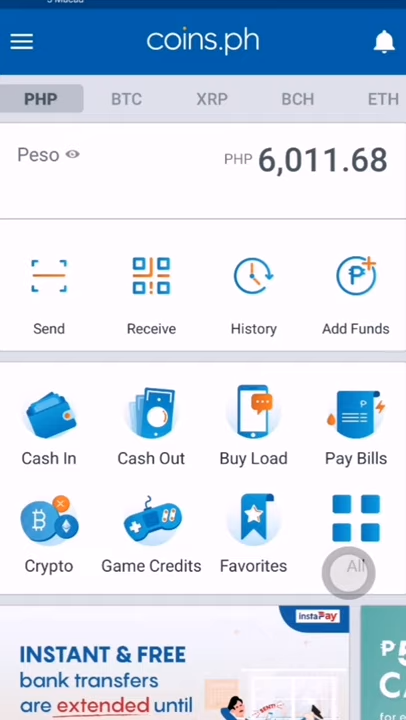
- Launch the application on your mobile device and log in securely using your biometric data or PIN.
- From the main dashboard screen, look for the core action buttons (typically located at the top or center panel) and tap “Send” or “Cash Out”.
- Select “E-Wallets” or “To Banks & E-Wallets” from the payout options list.
Step 2: Choose GCash as the Payout Channel
- You will be presented with a comprehensive list of supported banks and electronic wallets in the Philippines.
- Scroll down or use the search bar to locate and select “GCash“.
Step 3: Enter the Transfer Details
Carefully input the required information in the transaction form:
- Amount: Type the exact amount of Philippine Pesos (PHP) you want to send. Keep the system transaction limits and transaction fee overhead in mind.
- Account Number / Mobile Number: Enter the 11-digit GCash mobile number of the recipient (formatted generally as 09XXXXXXXXX).
- Account Name: Input the exact legal first and last name of the GCash account holder.
Tip: For peace of mind, toggle the option to “Save this beneficiary” if you plan on making frequent transfers to this specific GCash account in the future.
Step 4: Choose the Transfer Method (InstaPay vs. PESONet)
Depending on system availability and parameters, you may be prompted to select the clearing network:
- (Recommended): Real-time settlement. The funds hit the target GCash wallet in seconds. This network carries a lower maximum transaction cap per transaction but is highly preferred for instant personal needs.
- : Batch clearing framework. Perfect for very large transactional volumes, but clearing occurs in batches during business hours. Funds may take a few hours or up to the next business day to reflect.
Step 5: Review and Complete Verification
- A transaction summary screen will appear. Thoroughly audit the recipient’s name, mobile phone number, and total deductions (including network fees).
- If everything is correct, slide or tap “Confirm Transfer”.
- Pass the security check. You will be required to enter a One-Time Password (OTP) sent to your registered mobile number/email or retrieve a token code from your integrated Authenticator App (2FA).
Once approved, a success screen will display your transaction reference number. It’s highly recommended to take a quick screenshot for your personal financial records.
Dynamic Transfer Limits and Processing Fees
Understanding the structural constraints of your financial pipeline prevents processing delays. Cross-platform transactions incur structural operating expenses determined by local real-time gateway networks:
| Clearing Network | Transfer Speed | Average Network Fee | Recommended For |
| Instant (Seconds) | ₱15.00 – ₱25.00 per transaction | Immediate payments, urgent bills, peer-to-peer transfers | |
| Same/Next Business Day | Varied (Often flat or low-tier) | Large lump sums, non-urgent portfolio rebalancing |
Note: Individual daily and monthly transfer thresholds are strictly determined by your specific Verification Level and GCash wallet tier. Level 2 Coins.ph users generally experience ample daily transactional allowances suitable for standard use cases.
Crucial Security Best Practices
Moving funds between cryptocurrency platforms and local retail wallets requires high vigilance. Keep these crucial security tips in mind:
- Beware of Social Engineering: or GCash representatives will never message you on social media or call you asking for your passwords, OTP codes, or 2FA tokens. Treat these codes with absolute privacy.
- Double-Check the Clipboard: If you copy and paste the GCash phone number from another messaging app, review the pasted digits sequentially inside the screen. Certain malware strains target clipboards to quietly swap out wallet addresses or numbers.
- Maintain App Updates: Regularly check the Google Play Store, Apple App Store, or Huawei AppGallery to confirm you are using the official, highly optimized versions of both applications. Updates contain important security patches that safeguard your digital funds.
Troubleshooting Common Issues
If your transfer encounters a hitch, don’t panic. Here are the most frequent roadblocks and how to resolve them:
1. Transaction is “Pending” or Delayed
If you initiated the transfer via InstaPay but the funds haven’t reflected on GCash after several minutes, check the system status updates inside the app or look for global network down-time advisories. If the network experiences temporary congestion, the funds will either clear eventually or automatically reverse back into your Coins.ph PHP wallet within 24 to 48 hours.
2. Insufficient Balance Error
Remember that the transaction fee is added onto your principal transfer amount rather than deducted from it. For example, if you want to transfer exactly ₱1,000 via InstaPay and the gateway fee is ₱15, your wallet must possess a gross balance of at least ₱1,015 to clear processing.
3. Exceeded Wallet Limits
If the transaction fails completely, you or your recipient may have reached the maximum inbound or outbound monthly transaction thresholds. You will need to wait for the calendar month to reset or upgrade your account verification tier to unlock higher limits.
Bridging your assets from to GCash is an incredibly powerful mechanism for managing digital liquidity in the Philippines. By following this step-by-step framework, choosing the right transfer network for your needs, and adhering to strict validation protocols, you ensure your funds safely navigate to their destination every single time.